10 Best Live Chat Apps for Shopify Stores in 2026
Want to stop losing sales on your Shopify store? Live chat might be the answer. When shoppers have questions about your products, shipping, or return policy, they expect answers fast. If they can't get help right away, many just leave.
This guide breaks down the top 10 live chat Shopify apps you can add to your store. We kept it simple, focusing on what each app does, how much it costs, and whether it might be right for your business.
Why Use Shopify Live Chat Apps?
Did you know businesses that respond to a customer’s chat within 5 minutes are 69% more likely to get a sale? Yes, that’s exactly what Shopify's data has shown! Think about the last time you shopped in a real store. If you had a question, you could ask someone right away. Online stores don't have that - unless they add live chat.
Stores that use live chat sell more stuff. That's a fact. Nearly 8 out of 10 shoppers say they like live chat because they don't have to wait for answers.
Here's how live chat helps:
- Shoppers can ask about products before they decide not to buy
- Fewer people leave items in their carts without buying
- Customers feel better about your store when you help them quickly
- You learn what confuses shoppers about your products or website
Let's check out which live chat apps work best with Shopify.
10 Best Live Chat Apps for Shopify Stores
App | Best For | Starting Price | Free Option | User Rating |
Shopify Inbox | Shopify users seeking a native solution | Free | Yes | 4.7/5 |
Tidio Live Chat & AI Chatbots | Shops want AI-powered chatbots and multi-channel support | $29/month | Yes | 4.6/5 |
Omega WhatsApp Chat, Contact Form | Engaging customers across multiple chat platforms, including Facebook Messenger and WhatsApp | Free | Yes | 4.9/5 |
LiveChat: AI live chat by Text | Ecommerce stores and service brands that need faster response times, round-the-clock support, | $24/month | No | 4.8/5 |
Moose: Live Chat FAQ Whatsapp | Small businesses need a free and simple chat solution | Free | Yes | 5/5 |
Chatty AI Chatbot & Live Chat | Shops looking to automate responses and offer real-time support | Free | Yes | 5/5 |
Gorgias: Helpdesk, Chat & FAQ | E-commerce businesses need multi-channel support and automation | $10/month | Yes | 4.2/5 |
BestChat: AI Chatbot+Live Chat | Shops are looking for AI-driven chatbots and live chat integration | Free | Yes | 4.7/5 |
Re:amaze Live Chat | Businesses needing comprehensive helpdesk support and automation | $29/month | No | 4.5/5 |
Chatway Live Chat FAQ WhatsApp | Businesses looking for live chat on multiple platforms | Free | No | 4.9/5 |
Note: User ratings are based on available reviews as of December 2025.
Shopify Inbox: The Free Option Made by Shopify

Need a live chat app for Shopify? Shopify has made this chat app itself, so it works with your store right out of the box. No fuss, no extra fees.
What It Does:
- Shows you what products the shopper looked at and what's in their cart
- Suggests answers to common questions
- Greets customers automatically
- Works inside your Shopify dashboard, where you already work
Price: Totally free
What's Good: Since Shopify made it, it hooks right into your store data. You can see exactly what the customer is looking at while chatting with them. Setup is super easy because it's part of Shopify already.
What's Not So Good: You can't change much about how it looks or works. Other apps have fancier features like detailed reports or more advanced automation.
Who Should Use It: New store owners who want something free that just works without any tech headaches.
Tidio Live Chat & AI Chatbots

Tidio gives you both regular chat and smart chatbots that can answer questions on their own. It's easy to set up even if you know nothing about tech.
What It Does:
- Uses smart chatbots to answer common questions 24/7
- Let you build chatbots by clicking, not coding
- Puts messages from your website, email, and Facebook all in one place
- Shows you who's on your site and what they're doing
Price:
- Free plan to start
- Paid plans from $29/month
What's Good: Chatbots can handle questions about shipping, returns, or products while you're busy doing other things. You don't have to check different places for messages - everything comes to one inbox.
What's Not So Good: The free version doesn't show many stats about how well your chat is working. And robots can't solve every problem - tough questions still need a human.
Who Should Use It: Store owners who get asked the same questions over and over and want a robot to handle the easy stuff.
O: WhatsApp Chat, Contact Form

Omega WhatsApp Chat, Contact Form is one of the top apps in this live chat Shopify apps list. This live chat Shopify app allows you to add chat options directly to your store, integrating with popular platforms like Facebook Messenger, WhatsApp, Instagram, and more. It helps improve customer engagement and sales conversion by offering multiple communication channels.
What It Does:
- Adds a chat button for Messenger, WhatsApp, and other platforms
- Customizes chat widget style, message types, and channels
- Tracks visitor data and provides detailed analytics
- Provides a fully customized welcome message and chat window
Price:
- Free plan available
- Paid plans starting only at $2.99/month
What's Good:
- Seamless integration with multiple chat platforms
- Fully customizable chat widget to match store aesthetics
- Offers a free plan with unlimited visitors per month
- The paid version is also very affordable, starting at just $2.99.
- 24/7 live chat support, even on the free plan
What's Not So Good:
- Limited features on the free plan compared to paid options
- Some advanced features like analytics and unlimited chat agents, are only available in paid tiers
Who Should Use It: Stores that want to integrate multiple messaging platforms into one chat button and offer responsive customer support, especially those with a large customer base requiring multi-channel communication.
LiveChat: AI live chat by Text
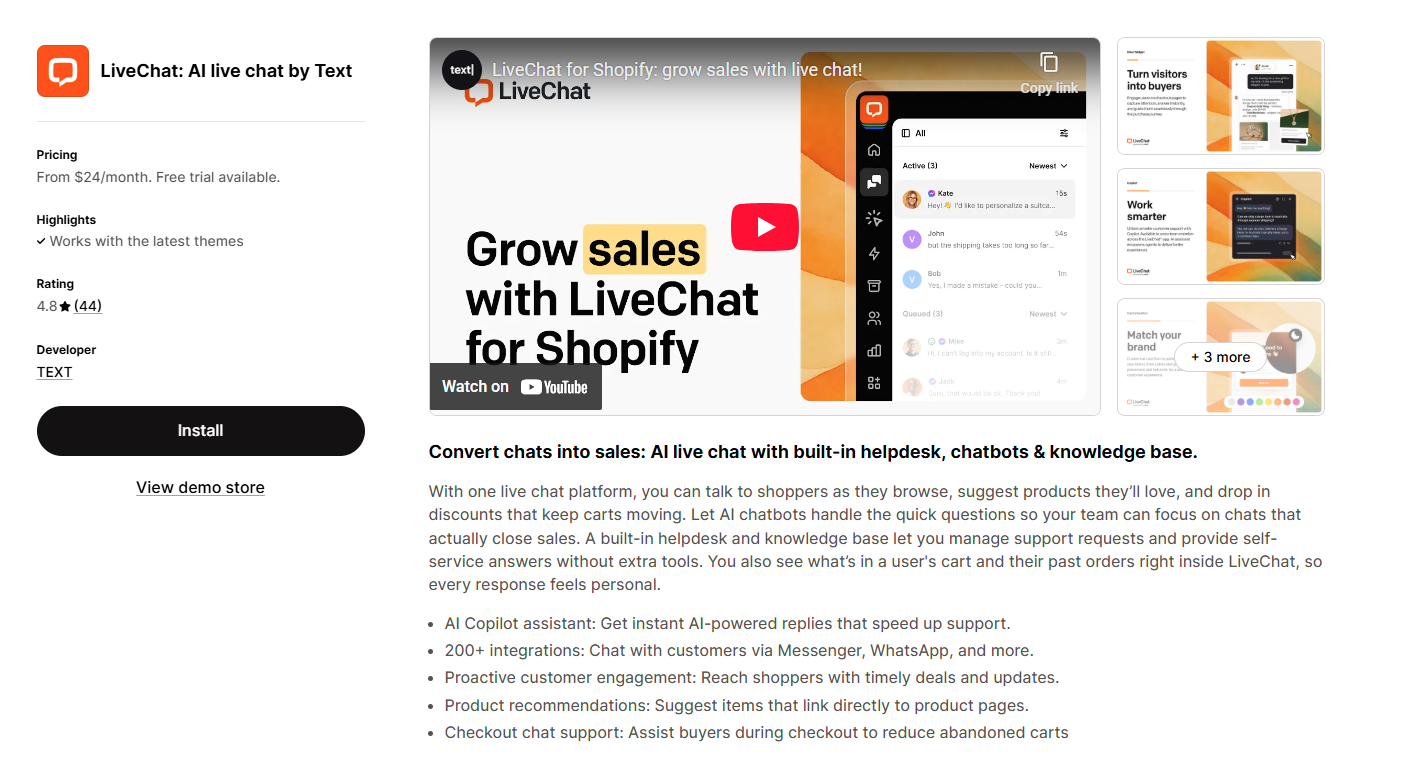
LiveChat is redefining customer service by combining speed, personalization, and efficiency. In an era where 40% of customers prefer companies offering live chat, and businesses see a 20% boost in conversions, LiveChat is not just a customer service tool - it amplifies customer engagement, increases their satisfaction levels, and boosts shopping cart value.
What It Does:
- Real-time live chat with AI‑assisted responses.
- 24/7 AI chatbots and canned replies to automate support.
- Proactive messages that help reduce cart abandonment.
- Smart task distribution between AI and human agents.
- Real-time analytics with actionable customer insights.
- Integrations with 200+ apps, including Shopify, WordPress, WhatsApp, and CRM tools.
Price:
- Starter: $24/month
- Team: $49/month
- Business: $69/month
What's Good:
- Extremely fast response times with AI support
- Proactive messaging to capture sales before customers leave
- A clean and intuitive interface that reduces agent workload.
- Strong reporting and analytics for data-driven decisions 24/7 availability via AI chatbots.
- Deep integrations with over 200 apps, making setup straightforward
What's Not So Good:
- Lower-tier plans limit some automation and advanced analytics
- No free plans, but offers a 14-day trial.
Who Should Use It: Businesses that want a reliable, revenue-focused live chat system with strong AI automation. It’s ideal for ecommerce stores, SaaS companies, and service brands that need faster response times, around the clock support, and the ability to convert more visitors with real-time engagement.
Moose: Live Chat FAQ Whatsapp

MooseDesk combines your live chat, WhatsApp, Messenger, and Instagram messages into one simple dashboard. It's like having a virtual customer service desk that fits in your pocket. Store owners can chat with customers in real-time, manage support tickets, and even let customers find answers themselves through a customizable FAQ section.
The app is designed to make customer support feel less like a chore and more like a conversation. And the best part? You don't need to keep switching between different apps to stay on top of customer questions.
What it does:
- See all your customer conversations in one place – whether they came from live chat, email, WhatsApp, or social media
- Answer customer questions on the go using the mobile app
- Let customers find answers to common questions with the AI-powered FAQ widget
- Customers can check their order status without needing to contact you
- Make the chat widget match your store's look and feel
- Add buttons that send customers directly to your WhatsApp, Messenger, or other platforms
Pricing:
- Free plan available.
- Paid plans: Pricing details available upon request, likely based on additional features and advanced use cases.
What store owners love:
- No more jumping between apps to answer customer questions
- The mobile app lets you provide great service even when you're away from your computer
- The customizable chat widget blends seamlessly with your store's design
- Pre-built templates for FAQs and contact pages save you time
Room for Improvement:
- The free plan covers the basics, but you might outgrow it as your store expands
- The pricing structure could be more transparent, making it easier to plan your customer service budget
Who should use it:
- E-commerce businesses need an all-in-one customer support hub to engage with customers via live chat, social media, and email.
- Stores with a multilingual audience, as the app’s AI translation features make it easier to support a global customer base. Merchants are looking to streamline customer service across different channels while maintaining branding consistency and control over user experience.
Chatway Live Chat FAQ WhatsApp

Chatway isn't just another live chat tool—it's a complete customer support hub that connects your Shopify store with the messaging platforms your customers already love. By integrating WhatsApp, Facebook Messenger, Telegram, and traditional live chat, you can meet your customers wherever they prefer to communicate.
This app simplifies your customer service workflow by giving you one central inbox for all conversations. No more switching between tabs or missing important messages. Whether you're at your desk or on the go, Chatway keeps you connected through their mobile apps for both iOS and Android.
What It Does:
- Adds a live chat inbox widget for customer support, integrating with platforms like WhatsApp, Facebook Messenger, and SMS.
- Provides canned responses and FAQ to improve live chat efficiency and reduce response times.
- Allows mobile chat support via apps for iOS and Android, providing support anytime, anywhere.
- Offers customizable live chat widget and chat buttons for multiple platforms.
- Integrates with Shopify data, including cart, orders, and coupons, to enhance support.
- Allows you to assign agents to specific customer service conversations for better management.
Price:
- Free plan available:
- Pro plan start from $15/month (or $108/year, saving 40%)
What's Good:
- Seamless integration with popular messaging platforms like WhatsApp, Facebook Messenger, and SMS, allowing for a unified customer support experience.
- Available on both iOS and Android, so you can manage customer service on the go.
- Highly customizable live chat widget to match store branding and provide a unique customer support experience.
- The free plan is robust, offering unlimited chats, basic integrations, and mobile support, making it a solid option for small businesses. The paid plan is also reasonably priced with added features.
- The pro plan includes live translation and a multilingual widget, ideal for global customers.
What's Not So Good:
- Some advanced features like unlimited chat history, live translation, and custom tags are only available in the paid version.
- More in-depth analytics are not available on the free plan, which could limit insights for larger teams or stores that want detailed performance tracking.
- The pro plan is required if you need to invite more agents to handle customer service conversations, which may not be cost-effective for smaller stores.
Who Should Use It:
- Small to medium-sized e-commerce stores that need a simple yet effective live chat solution, especially if they want to integrate WhatsApp, Facebook Messenger, and other platforms into their support system.
- Global stores that require multilingual support and a mobile-enabled customer service platform.
- Stores that prioritize efficiency in customer service with features like canned responses, FAQs, and agent assignment, which streamline interactions and reduce response times.
Chatty AI Chatbot & Live Chat

Chatty lets you chat with customers not just on your website but also through apps they already use.
What It Does:
- Works with WhatsApp and Facebook Messenger
- Uses smart bots to answer common questions
- Helps customers track their orders automatically
- Let's you change how the chat box looks
Price:
- Has a free starter plan
- Paid plans from $19.99/month
What's Good: Customers can reach you through whatever app they like best - your website, WhatsApp, or Facebook. The smart bot can answer simple questions and help track orders without you having to do anything. If the question gets tricky, it can hand off to a real person smoothly.
What's Not So Good: The free plan doesn't do much. And sometimes the smart bot gets confused by complicated questions.
Who Should Use It: Stores whose customers like to chat through WhatsApp or Facebook instead of just the website.
Gorgias: Helpdesk, Chat & FAQ

Gorgias isn't just one of the Shopify chat apps - it's a whole customer service system made specially for online stores.
What It Does:
- Hooks deep into Shopify to manage orders
- Sets up smart rules to automate support work
- Puts all customer messages in one place
- Shows how support chats affect your sales
Price: Starts at $10/month
What's Good: Support staff can see and change orders, give refunds, and update customer info right from the chat window. You can set up rules to automatically assign support tickets, send auto-replies, and put urgent issues at the top of the list.
What's Not So Good: It's expensive - too pricey for small shops. It takes longer to learn because it does so much.
Who Should Use It: Bigger, established stores with lots of customer questions, several support staff, and complex support needs.
BestChat: AI Chatbot+Live Chat

Why did we choose BestChat: AI Chatbot+Live Chat in this live chat Shopify apps list? This app can use smart chatbots but keeps humans in the loop for the perfect mix of quick answers and personal help.
What It Does:
- Has a chatbot that gets smarter over time
- Smoothly hands over to real people when needed
- Let you design the chat box your way
- Tracks how happy customers are with the help they get
Price: Available with the free plan. Starts at $10/month
What's Good: The chat robot learns from each conversation and gets better at answering questions. When the robot can't help, it passes the whole conversation to a real person without the customer having to repeat themselves.
What's Not So Good: Starting at $10/month makes it more expensive than some other options for new stores. It doesn't connect with as many other tools as some competitors do.
Who Should Use It: Stores that want robots handling the easy stuff and real people jumping in for the harder questions.
Reamaze Live Chat Helpdesk CRM

Re:amaze focuses on helping you build lasting relationships with customers through better support.
What It Does:
- Group customers by what they buy or how they behave
- Sets up automatic follow-ups and actions
- Shows detailed reports about customer support
- Includes a help center for common questions
Price: Starts at $29/month
What's Good: You can sort customers based on what they've bought, their support history, or other things you care about. You can set up systems to automatically assign conversations to the right team member, send follow-up messages, or take actions based on what customers do.
What's Not So Good: At $29/month to start, it's too expensive for many small stores. Some people find it harder to use than simpler chat tools.
Who Should Use It: Stores that focus heavily on customer relationships and want to personalize the support experience.
How to Pick the Right Live Chat Shopify Apps for Your Store?
Think about these things when choosing a chat app:
- Money: If you're just starting out, try the free ones like Shopify Inbox. You can always switch to a paid app later when you're making more sales.
- Store Size: Got a small store? Basic chat is probably fine. Running a bigger operation with multiple people? Look for apps with team features and detailed reports.
- How Many Questions You Get: If you get tons of the same questions over and over, look for apps with good automation or chatbots.
- Tech Know-How: Some apps are super easy to use. Others need more setup. Be honest about your skills and pick something you can handle.
- Future Plans: Choose an app that can grow with your store. It's easier to start with an app that offers different levels than to switch to a new app later.
Find Your Perfect Live Chat Solution with Letsmetrix
Struggling to choose among dozens of live chat Shopify apps? Letsmetrix makes this decision much easier. This powerful comparison platform specifically helps you evaluate different live chat Shopify apps by displaying key metrics side-by-side.
What makes Letsmetrix stand out when comparing live chat Shopify apps is how it organizes critical information about each option. Instead of jumping between tabs and app descriptions, you'll see everything in one unified view:
- Real Performance Data: See actual impact metrics of different chat solutions
- Feature Comparison: Instantly spot which live chat Shopify apps have the specific capabilities your store needs
- Verified User Experiences: Read filtered reviews focusing on what matters to your business
- Cost Analysis: Understand the true value proposition beyond just monthly fees
- Trend Insights: Discover which live chat Shopify apps are gaining momentum with successful stores
- Technical Compatibility: Confirm which options work smoothly with your existing tech stack
- Personalized Suggestions: Get tailored recommendations based on your store's unique attributes

The process couldn't be simpler: visit Letsmetrix, search for the live chat Shopify apps you're considering, select your options, click "Compare" - and instantly access a comprehensive analysis that helps you make a confident decision.
You can also go to each app’s detail page, click the “Compare” button, and use the search bar to add other apps to compare.

For a more detailed comparison, check the list of alternative apps and click on any of them to see how they compare.

Bottom Line
There's no single "best" live chat Shopify app for everyone. The right one depends on your budget, customer volume, team size, and business goals. Look for live chat Shopify apps with simple setup, pre-saved responses, and good integration with your existing tools. Many store owners find that visitor tracking and analytics provide valuable insights about customer needs. Before committing, use free trials to test how well each option works with your specific store and customers.

1778146500970.png&w=3840&q=75)
1778052641749.png&w=3840&q=75)
1778220787051.png&w=3840&q=75)
1777884794983.png&w=3840&q=75)
1777446574562.png&w=3840&q=75)
1777436136439.png&w=3840&q=75)
1777368900479.png&w=3840&q=75)
(1)1776226010776.png&w=3840&q=75)
![Top 7 Klaviyo Alternatives and Competitors in 2026 [with Real Ratings]](/_next/image?url=https%3A%2F%2Fapi-wix.letsmetrix.com%2Fuploads%2FKlaviyoAlternatives(1)1775801269772.png&w=3840&q=75)
![7 Simprosys Feed Alternatives and Competitors in 2026 [with Real Ratings]](/_next/image?url=https%3A%2F%2Fapi-wix.letsmetrix.com%2Fuploads%2FBestSimprosysAlternatives(2)1775618960956.png&w=3840&q=75)
![7 Zapiet Delivery Alternatives and Competitors in 2026 [with Real Ratings]](/_next/image?url=https%3A%2F%2Fapi-wix.letsmetrix.com%2Fuploads%2FBestZapietAlternatives(1)1775554997133.png&w=3840&q=75)
![Top 7 Yotpo Product Review Alternatives and Competitors in 2026 [with Real Ratings]](/_next/image?url=https%3A%2F%2Fapi-wix.letsmetrix.com%2Fuploads%2FYotpoAlternatives(1)1775030798334.png&w=3840&q=75)
![Top 6 Printify POD Alternatives and Competitors in 2026 [with Real Ratings]](/_next/image?url=https%3A%2F%2Fapi-wix.letsmetrix.com%2Fuploads%2FBestPrintifyAlternatives(1)1775722341976.png&w=3840&q=75)
![10 Loox Product Review Alternatives and Competitors in 2026 [with Real Ratings]](/_next/image?url=https%3A%2F%2Fapi-wix.letsmetrix.com%2Fuploads%2FLooxReview-Alternatives(1)1775122103992.png&w=3840&q=75)
![Best PageFly Alternatives and Competitors in 2026 [with Real Ratings]](/_next/image?url=https%3A%2F%2Fapi-wix.letsmetrix.com%2Fuploads%2FPageFlyAlternatives(1)1774949797261.png&w=3840&q=75)